

Why the right setup is important
Product and Customer Success teams in B2B need precise and continuous view of customer insights. This includes customer feedback, feature wishes and objections. AI can help being close to customers, but has to be used the right way. A successful setup needs to avoid team members spending a lot of time on call reviews, or create exploding token budgets.
Two scenarios dominate today for Product and CS teams to be close to clients and their product perception:
- Teams work in a “pre-AI” age. They gather feedback in alignment meetings between the two departments, where CS updates Product on the latest client views. Product Managers join customer calls to “feel the pulse”.
- Teams have adopted AI and record customer calls to the best of their ability. They look at call transcripts manually, or upload them to their favourite LLM to get a rundown. Firms with larger budgets may use expensive MCP solutions to directly “chat with call transcripts”, driving up three things: subscription costs of transcription tools, token costs of LLMs, time spent by employees.
Both options are not sustainable for companies to run in the long term.
Three steps to set this up
You need three ingredients to run your voice of customer analysis fully automated:
- call transcripts
- a central storage place populated with context skills
- an LLM tool
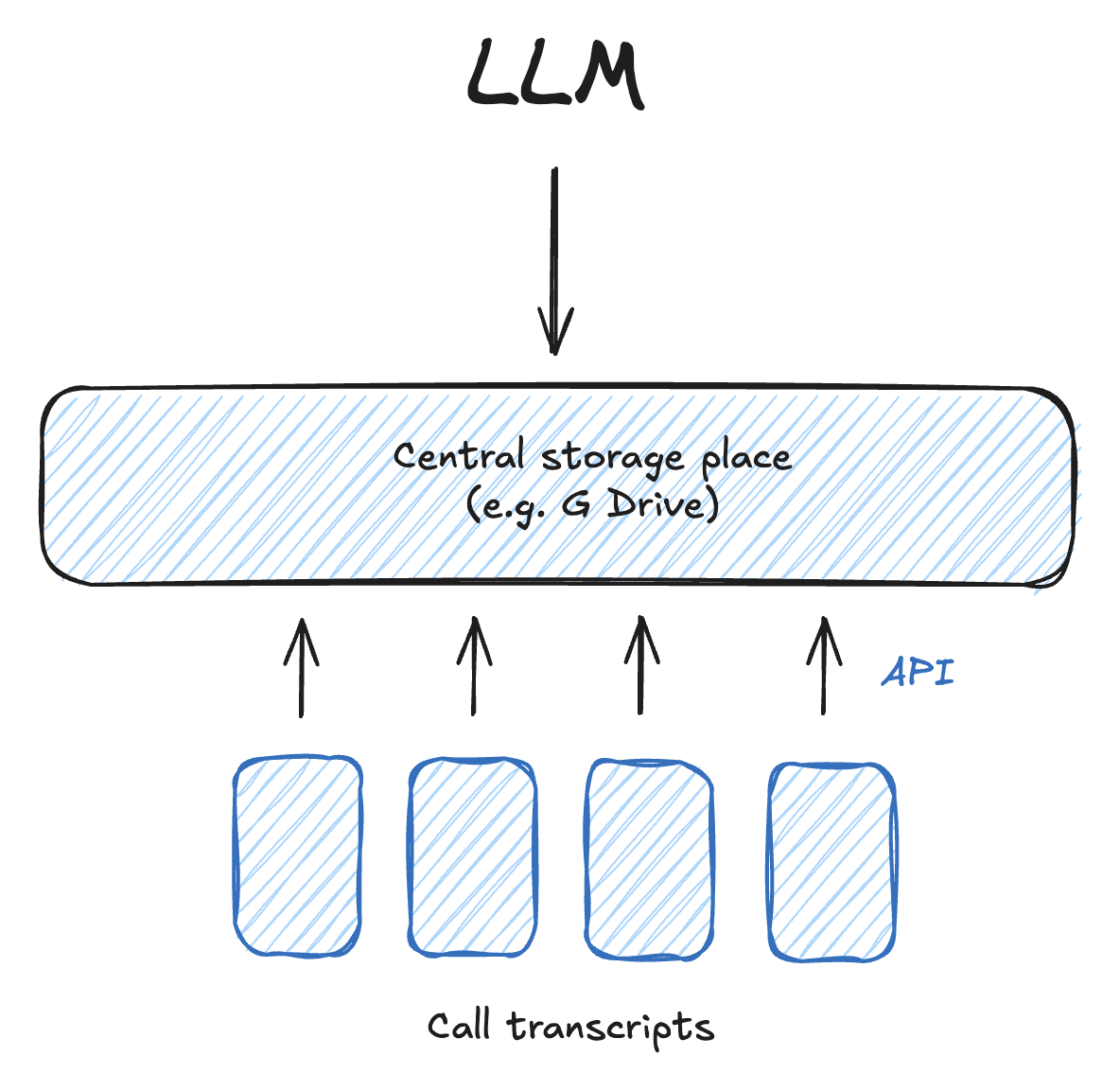
This is how you set this up, step by step.
1) Transcribe all calls
Customer calls are the main source of customer insights for B2B customer teams. Support tickets or emails are also important and can be included for an analysis of customer insights (see below). But calls are by far the richest source of contextual information, sentiment and unfiltered feedback. It is therefore important to transcribe these to the largest extent possible.
How to set this up
There are a LOT of tools out there which record and / or transcribe your calls. You have to make one fundamental decision when selecting a tool: Do you want the tool to also record the actual screen, or is transcription enough?
The first option will lead to tools which actually join your call as a participant. The second option will lead to tools which mostly run on your computer.
Below is a selection of tools:
| Joins the call as a participant (records video + audio) | Runs on your computer (transcript and notes only) |
|---|---|
 |  |
 |  Krisp Krisp |
 Fireflies Fireflies |  Notion AI Meeting Notes Notion AI Meeting Notes |
 Fathom Fathom |  Google Meet notes by Gemini Google Meet notes by Gemini |
 Avoma Avoma | |
 Demodesk Demodesk |
2) Save call transcripts into a central storage place organised for context
Scattered transcripts sitting inside an individual recording tool create data silos. Centralizing them allows AI models to analyze trends across all calls simultaneously instead of evaluating calls in isolation. It also allows to analyse a set of calls once, and save the obtained insights for future inquiries. This avoids both manual work and token-intensive MCP solutions.
How to set up a central storage place
Start with the IT infrastructure you have. You can use Microsoft Sharepoint, Google Drive or other provider solutions you use to store your data.
The best way to sync the data from your recording tool to the folder is via API. The recording tools listed above all support one. Set up the sync on a weekdaily basis, or at least weekly depending how often and recent you need updated customer insights.
Optional: same as with the call transcripts, you can feed in information on product tickets from systems such as Linear, Jira or Notion, support tickets, or emails.
3) Use an LLM to access this
Use your go-to LLM solution to access this folder. Start the chat with this prompt first:
Get an understanding of the folder
Afterwards, prompt the LLM to extract key information relevant for the voice of customer from the transcripts. For instance:
- Product feedback
- Objections
- Bugs
- Feature requests
- Articulated pains
Instruct the LLM to save the output in a dedicated subfolder.
LLMs are good at analysing natural language. They eliminate manual reading by extracting structured data, objections, feature requests, competitor mentions, into standardized formats in seconds.
Re-run this extraction once a week. Any team member accessing this folder with its LLM will be able to immediately access this analysis.
For a more comprehensive view on the fundamentals of this extraction process, read: The one thing you have to do to become an AI-native GTM team.
FAQ
Does uploading customer call transcripts violate enterprise data privacy?
Ensure that you deploy an in-tenant setup. By processing transcripts inside your own cloud boundary (AWS/Azure/GCP or enterprise API accounts with zero-data-retention agreements), customer data never leaves your security infrastructure.
How does this cut LLM token costs compared to standard AI tools?
Standard LLM workflows reload the entire raw transcript every time you ask a question. This uses up tokens. The Limbi setup described here analyses calls just once and saves the extraction information in a storage folder the entire team and their LLMs have access to.
How long does it take to deploy this setup?
It depends on whether you already have software for call transcriptions and use an LLM solution. We’ve seen ranges from a few days to 3 weeks to have first results.
Need help setting this up?
If you are running into problems setting this up, or executing this at scale, reach out.